AI document processing that turns files into checked records
For teams that retype invoices, forms or applications into another system. We build an intake workflow that reads each document, checks the fields you need, sends doubtful cases to a person and passes approved records to the next system.
- ReceiveEvery file and page logged
- CheckFields validated, doubts flagged
- Hand offApproved records sent on
The problem
Manual data entry from documents costs hours and lets errors through
Someone opens each file, finds the values, types them into another system and hopes nothing was missed. The errors surface later, in reports or with customers.
Extraction tools speed up reading. Field checks and a person reviewing the doubtful cases keep wrong values out of the next system.
How it works
Four steps for every document
- 01
Define the document
One document type, the fields you need, the rules each field must pass and the system it goes to.
- 02
Extract and check
Read the values, then test them: totals add up, references exist, nothing is duplicated. A confidence score is one input among several.
- 03
Review the doubtful ones
A reviewer sees the source page, the proposed value and the reason it was flagged, and approves or corrects it.
- 04
Hand off once
Approved records go to one agreed destination, are written once and are confirmed by reading them back.
Example
A supplier invoice with two order numbers
The workflow holds it for review
An invoice shows two possible purchase-order references. The workflow keeps both, flags the conflict and leaves the record in review. A person picks the right order before anything reaches accounting. A missing tax line or totals that do not add up are flagged the same way.
- Arrives as
- A PDF invoice with two order references
- Leaves as
- One approved record, or a flagged item with its reason
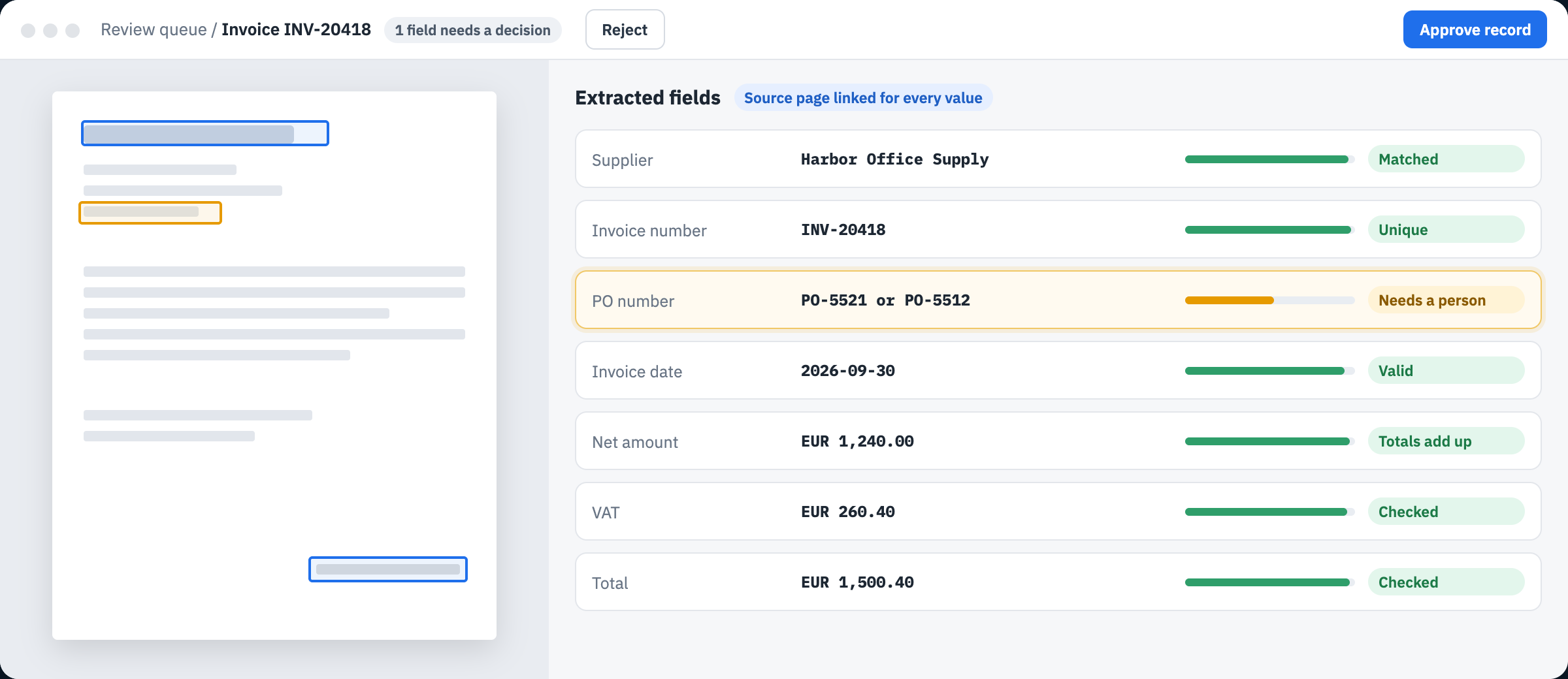
- Source on the pageEvery value links to the spot on the document where it was found.
- Conflict heldTwo possible order numbers, so the record waits for a person to pick one.
- Totals checkedNet amount plus VAT is checked against the invoice total.
- ApprovalNothing reaches accounting until someone approves the record.
Acceptance rules agreed before the build
How you will know it works
| Check | What the pilot must show |
|---|---|
| Coverage | Every file and page has a recorded outcome, including the ones that could not be read. |
| Field accuracy | Required fields match reviewed reference answers, with errors shown by field and document type. |
| Review routing | Incomplete, conflicting and ambiguous cases reach a reviewer before anything is written downstream. |
| Clean handoff | Each approved record reaches its destination once, confirmed by a read-back. |
| Business value | Handling time and reviewer effort compared with today's baseline, against thresholds set from your real samples. |
What you receive
A first workflow you can measure
Intake rules
Supported formats, required fields, field checks and what counts as complete, written down and agreed.
Review path
A queue that shows the source page, the proposed value and the reason for each flag, with the action a reviewer may take.
Pilot results
Accuracy by field and document type, the cases that needed review, reviewer effort and a routine for running it.
How engagements work
A written scope and a fixed quote before any build
The founder of AGI Technologies leads every engagement, from the scoping call to the handover.
Every engagement starts with a written scope: the task, what you receive, how the result is judged, the running costs and who maintains it after handover.
The first pilot has a fixed quote, agreed before any work starts. It covers one document type, so you can judge the result before anything expands.
Questions
Before a scoping call
When is this a good first project?
When the same kind of document arrives often enough to measure today's effort, the fields are known, and someone can review the exceptions.
What should we bring?
A handful of representative documents, including awkward ones, the fields you need and the system they should end up in.
What about sensitive documents?
We agree up front where documents are processed and stored, who can see them and which providers are used, and we start with approved samples.
Will it make decisions on its own?
It prepares records and flags doubts. Payments, approvals and other consequential steps stay with your team unless you separately approve automating them.
How is the work priced?
After the scoping call you receive a written scope with a fixed quote for the first pilot. Running costs such as hosting and software accounts are listed separately in the same scope.
Scope the next step
Bring one document type
Send a few real examples, the fields you need and where they should go. On a 30-minute call we scope a first workflow and how its results will be judged.