In this guide
A Clay CRM enrichment refresh should recheck the fields needed for the next business decision, retain their evidence and update only permitted values on the confirmed CRM record. Start with a due cohort, separate attempted research from verified freshness, and preserve human context when results conflict.
For a revenue operations team, the useful outcome is a contact field that sales can use with a known evidence date and a clear exception path. A recently completed enrichment column shows only that research ran. This guide provides a field policy, a Clay column plan and an editable reference pack for an existing Clay and HubSpot setup. Use the Clay HubSpot integration guide for initial connection and matching.

This is a proposed operating policy. A valid same-value recheck can renew verification without rewriting the business value. Failed or contradictory evidence stays unresolved. The examples and download use fictional records.
How often should Clay refresh CRM data?
Data is fresh enough when its evidence meets the requirements of its intended use. A current role used in a planned sales conversation and an industry label used in quarterly analysis need different policies. Agree on the fields, evidence standard, permitted writes and reviewer before enabling paid runs.
On smaller screens, scroll to compare all columns.
| Example field and use | Example acceptance window | Permitted outcome |
|---|---|---|
| Contact role for an approved sales action | Recheck after 30 days; accept source observations no older than 30 days | Confirm the same role or propose a permitted job-title change. |
| Employer for account relationship context | Recheck after 30 days; accept source observations no older than 30 days | Confirm an unchanged employer. Route a different employer to relationship review. |
| Company industry for an approved account review | Recheck after 90 days; accept source observations no older than 90 days | Fill or change the company field if its owner permits it. |
These windows are editable example assumptions from this guide’s policy. An imminent action may require a new check sooner. A protected role note, relationship owner or lifecycle stage stays outside this refresh policy.
Separate high-use contacts with an approved next action from dormant contacts with no current use. Customers and open opportunities need an owner-approved purpose before inclusion in prospecting. An excluded record or identity hold takes precedence over a stale field. Keep this ordering explicit in both the due queue and the execution conditions.
Keep two clocks for each field
A company lookup can succeed while a person's employer remains unclear. A record-wide “last enriched” date hides that difference. Keep the following metadata for each important field or coherent field group:
last_attempt_at: when research actually ran, including a timeout.source_observed_at: when the underlying fact was observed, if the source provides a meaningful date.last_verified_at: when acceptable evidence and the required CRM outcome were confirmed.next_check_due_at: the next policy deadline, shortened if the accepted source observation expires sooner.verification_status,policy_versionand an evidence reference: what happened and why.retry_after_at: the earliest permitted retry, separate from freshness.
These are proposed custom property names. Use role_ or another field prefix so a role check cannot reset the employer clock. A retrieval date proves only when data was fetched. The observation date of the business fact belongs in its own field. In this reference policy, an unknown observation date enters review and cannot automatically advance verification. A reviewer can approve a different, documented rule for a particular source.
For accepted unchanged data, preserve the business value and confirm a metadata-only update. For accepted changed data, confirm the permitted value and metadata. If delivery fails, retain the accepted evidence time separately; the CRM verification clock stays unresolved. Recovering a write tomorrow must not make yesterday's evidence look newly observed.
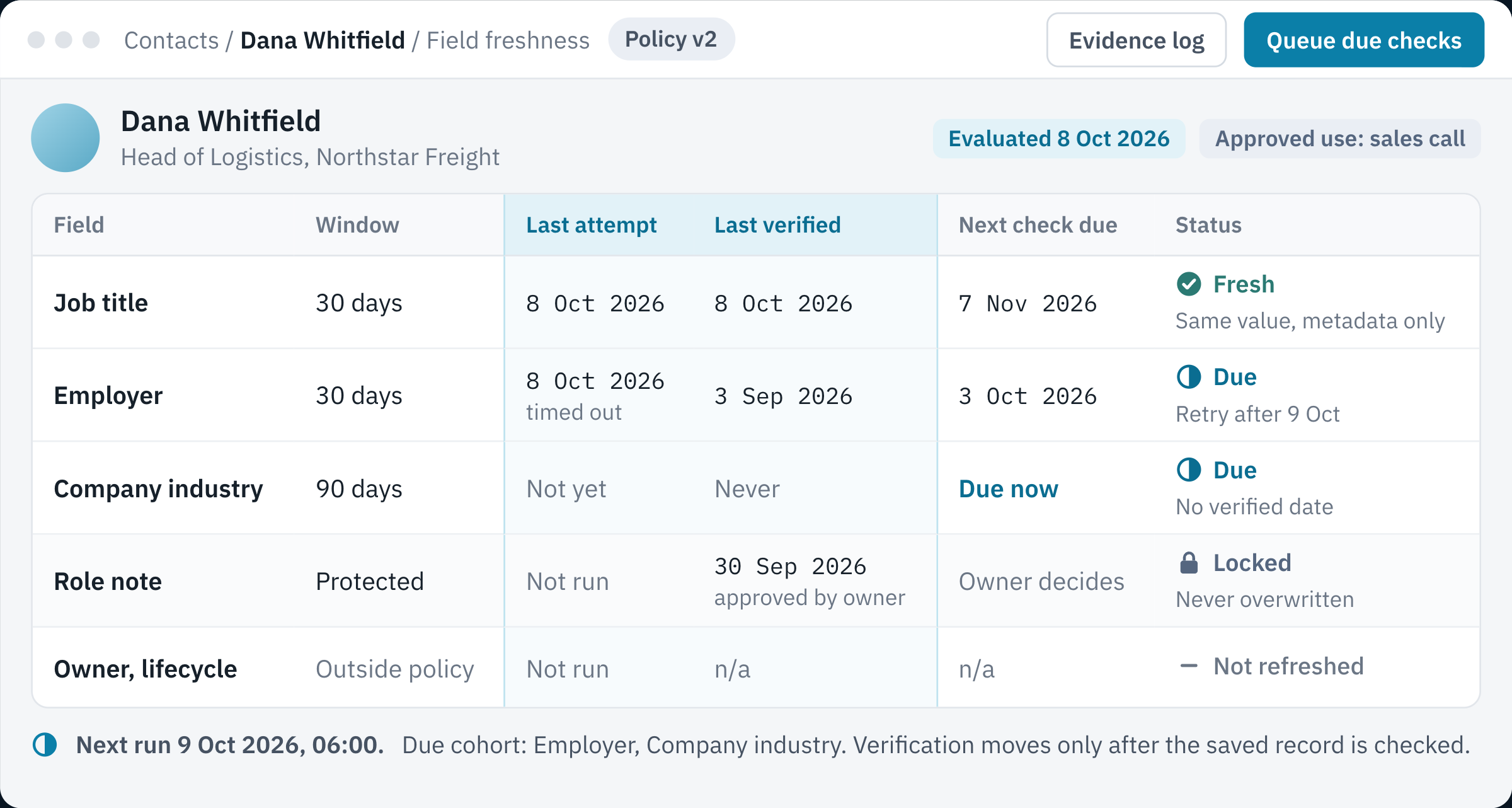
- Two clocksLast attempt and last verified are stored apart for every field.
- Attempt onlyThe employer check timed out on 8 October, so its verified date stays at 3 September.
- Missing dateA field that was never verified joins the due cohort.
- Protected valueAn owner-approved role note is never overwritten by a refresh.
Build a due cohort that includes missing dates
HubSpot active segments, previously called active lists, recalculate membership as records meet or cease to meet their criteria. The following logical filter illustrates a role-refresh segment using custom policy properties:
approved_refresh_use = true
AND refresh_excluded = false
AND identity_hold = false
AND role_manual_protected = false
AND (role is missing
     OR role_last_verified_at is unknown
     OR role_next_check_due_at is on/before the evaluation date)
AND (role_retry_after_at is unknown
     OR role_retry_after_at is on/before the evaluation date)
Reproduce that grouping with the operators available for the property types in your portal. If you implement the due alternatives as separate OR groups, repeat the eligibility and exclusion conditions in each group. Otherwise, an unknown date can accidentally admit an excluded record. HubSpot documents filter criteria, unknown values and AND/OR behavior; test representative records before using the segment.
Do not filter only for an overdue known date. That misses records never verified. Conversely, a missing deadline on a previously verified field should be repaired from its verification date and policy. Never treat it as evidence of freshness. Include the stored source-observation expiry when repairing that deadline. Check the CRM account timezone and the comparison boundary. The downloadable reference evaluates fictional date-only records on 8 October 2026; a production workflow should define its own timestamp precision and timezone.
Import the selected segment, existing object ID, current values and relevant metadata. In Clay's HubSpot source, leaving the list selection empty imports all objects. Confirm the selected population and count before any paid run. Keep protected and disputed records in a separate review view so excluding them from research does not conceal unresolved work.
Turn the policy into Clay columns and conditions
Keep CRM snapshots, research and write proposals in separate columns. A practical role-check table can use the following structure. The names describe your design; the reference pack does not install these columns.
On smaller screens, scroll to compare all columns.
| Column or group | Purpose | Gate before the next step |
|---|---|---|
HubSpot Object ID, CRM Role, policy dates, exclusions | Preserve the imported record and baseline value | Known ID and an approved use. |
Role Due, Retry Allowed, Can Research | Calculate whether this field should run | Eligible, unprotected, due, outside retry delay. |
Role Research, Proposed Role, Evidence URL, Source Observed At | Retain a proposal separately from CRM | Research only when Can Research is true. |
Evidence Accepted, Decision, Accepted Evidence At | Apply identity, source-age and conflict checks | Unclear evidence enters review. |
Current CRM Role, Baseline Still Matches, Write Approved | Recheck the current record before an allowed write | New human edits or changed permissions block it. |
Value Write, Metadata Write, Readback Confirmed | Deliver the allowed outcome and reconcile it | Verification remains unresolved until a check of the saved record matches. |
Configure an enrichment column's Only run if condition using the actual boolean columns. For example, express Can Research as eligible AND role due AND retry allowed AND no reusable accepted proposal. The same-value metadata action instead requires an accepted unchanged decision, current CRM agreement and write approval. A value action requires an accepted changed decision and the same protections. Never reuse Can Research as permission for a CRM write.
Clay documents conditional runs and table auto-run. Table auto-run is the parent of column auto-run, and “Keep existing results” prevents populated cells from automatically rerunning. Build with auto-run off, manually exercise selected rows, then deliberately enable the required columns. Express the policy in your actual column references and inspect the generated formula. Only a tested formula confirms the configuration.
The field map in the download includes example custom properties such as agi_role_last_verified_at, plus a contact jobtitle mapping. Use HubSpot’s property management guidance to confirm internal names, object types, writable fields and date serialization in the real portal. A company industry update needs the retained company object ID and its own action. Do not send a contact ID to that company action.
Separate scheduled imports from scheduled rechecks
Scheduled sources revisit the selected population. “Update existing rows” controls refreshing records already present in the table. Scheduled columns rerun selected enrichment and action columns. These are distinct controls; neither expresses your evidence standard or grants write permission.
Choose one deliberate research trigger during the pilot. For example, use a daily scheduled source with existing-row updates and gated enrichment auto-run. Alternatively, keep imported rows in the table and schedule the required enrichment columns, while separately refreshing eligibility and CRM snapshots. Scheduling both paths without testing can repeat work or use old eligibility. A contact leaving the source segment should not be assumed to disappear from an existing Clay table.
In both designs, re-evaluate exclusions and freshness immediately before research and writeback. Prove that a populated but overdue enrichment can rerun under the chosen existing-result settings, while a fresh or excluded row cannot. Keep CRM action columns off the initial schedule. Clay documents daily, weekly and monthly schedules, with hourly scheduling restricted to Enterprise; check your account's current limits before choosing a cadence. Queue delay and review time must also fit the business deadline.
Six cases that distinguish an attempt from freshness
These six test cases define expected behavior on 8 October 2026.
On smaller screens, scroll to compare all columns.
| Case | Evidence or event | Expected policy outcome and clocks |
|---|---|---|
| F01: high-use role due | Accepted evidence confirms the existing role | Keep role; confirm metadata only. Attempt and verification become 8 October after the saved record is checked. |
| F02: high-use role due | Provider times out; previously verified 10 September | Attempt becomes 8 October; verification remains 10 September. Keep due and apply bounded retry. |
| F03: low-use contact | No approved use despite old evidence | Defer paid research. Neither clock advances. |
| F04: employer conflict | Evidence proposes a different employer | Hold identity and relationship review. Attempt advances; employer verification stays unchanged. |
| F05: protected role note | Research proposes replacing a recently approved human value | Preserve protected text. Retain evidence for its owner; do not reset verification. |
| F06: missing company attribute | Acceptable evidence exists, but the CRM write fails | Preserve proposal and attempt time. Verification stays empty until delivery is reconciled. |
F01 and F02 both ran that day, but only F01 resolved freshness. F06 separates successful research from successful delivery. The expanded CSV also tests unknown verification dates, excluded records, fresh skips, unknown or old source dates, retry delays, a changed CRM baseline and expired pending evidence. Its offline Python evaluator returns explicit decisions; it has no Clay or CRM connection.
Recover accepted evidence without repeating paid research
For F06, first retain the proposal, evidence reference, observation date, acceptance time, object ID, baseline and intended properties. Then reconcile the actual CRM state. A timeout can occur after a server accepted a write, so do not infer failure solely from the client response.
- Read the retained object ID and inspect only the affected properties. If the permitted value and metadata already match the intended outcome, record the confirmation and stop.
- If a person changed the field, exclusions or protection state, hold the proposal for review. If its source evidence expired, obtain a new check before proceeding.
- If the approved change is still needed and evidence remains usable, retry only the missing write step. Do not rerun research by default.
- Check the saved record. Advance verification to the accepted evidence time only when every required value and metadata write is confirmed. Retain the later delivery-confirmation time separately.
For an unchanged role, the required result is confirmed metadata, with no role rewrite. For a changed role, both the permitted role value and metadata must match. Only a check of the saved record confirms that the intended properties persisted.
Clay's Update object action requires the object ID and defaults to ignoring blank values. Keep that protection, but recognize that it cannot reject an unauthorized nonblank value. A pre-write lookup also cannot guarantee an atomic comparison and write. Where competing updates are possible, use an appropriate controlled writer or review path and document its concurrency limit.
An employer change remains a relationship decision. Confirm identity and let the responsible owner decide account association and conversation context. Leave ownership, lifecycle, notes, associations and outreach enrollment outside this operation unless their own approved process owns the change.
How do you measure the cost of a refresh?
Report due fields, research attempts, accepted unchanged values, accepted changes, review cases and confirmed CRM outcomes separately. Track the oldest unresolved high-use field and delivery retries. A completed column can still leave the decision unresolved. Clay Table Alerts, documented for Enterprise, can monitor operational failures and inactivity; they do not establish that your field policy passed.
The downloadable economics sheet contains a worked scenario. Of 1 000 field checks screened, 100 are excluded or protected, 500 lack approved use and 250 are fresh. That leaves 150 due checks. A first pass accepts 120; 20 timeouts receive one retry and 10 conflicts enter review. The retry accepts 12 more. Delivery reconciliation ultimately confirms 128 useful checks, leaves four accepted proposals pending and 18 unresolved research or conflict cases.
Assume each of the 170 paid attempt events costs two credits, including failed attempts, and an allocated credit cost of USD 0.05. Research costs 340 credits, or USD 17. Add an assumed 22 minutes of review at USD 60 per hour, or USD 22. The modeled cost is USD 39 / 128 confirmed checks = approximately USD 0.305 per confirmed useful check.
Those inputs are editable assumptions for the worked example. The scenario excludes subscriptions, implementation and other platform costs. Replace the charge basis with actual billed usage, particularly where provider charging differs on failures. Use the waterfall cost guide for provider accounting; this policy adds a check that the result reached the CRM while still useful.
Download the policy and prove one loop
Download the editable CRM freshness policy pack (ZIP). It includes policy.csv, the expanded policy-fixture.csv, field-map.csv, economics.csv, a recovery and pilot runbook, and an optional standard-library Python reference evaluator with tests. The files are editable reference examples to adapt into your own Clay table and HubSpot workflow. They contain no credentials or real contact data.
Before increasing volume, run the six core cases and the missing-date/exclusion cases in a bounded workspace sample. Confirm source membership, column gates, unchanged metadata, protected values and failed-write recovery. Keep downstream sales actions disabled during testing. A passing local evaluator covers the policy logic only; platform configuration, scheduler timing and CRM delivery need their own checks.
Keep authorized before-value snapshots and a narrow restoration procedure. Clay Table Versions captures configuration only. Overwritten or deleted cell values depend on the before-value snapshots above. Assign one owner to the exception queue, a bounded retry limit and a stop condition for unexpected identity or overwrite proposals.
Review one refresh loop before scaling
AGI Technologies' Clay sourcing and enrichment service covers selective enrichment, CRM matching, freshness and cost control. For an existing setup, the Systems Readiness Review for Clay and HubSpot can inspect one agreed workflow and prioritize the changes to test.
Bring the selected cohort, mapped fields, current rules, a recent usage export and anonymized accepted, failed and disputed examples. Request a quote for a review scoped to a field-policy matrix, mapping and exclusion checks, an exception/recovery path and a pilot acceptance plan. Access, implementation and scheduling scope can be agreed from that evidence. The Clay implementation framework provides a wider project structure.
Sources and review date
Product documentation reviewed on 9 October 2026. This guide distinguishes documented product controls from its proposed operating policy, example test cases and modeled economics. Check current permissions, properties and plan limits in the workspace being implemented.
Reviewed by Andrii Gorbenko, founder of AGI Technologies