In this guide
Measure Clay waterfall enrichment cost per accepted record. Count the full path from an eligible input through provider attempts, verification and CRM matching. Keep Actions, Data Credits and external bills separate until you apply a documented monetary allocation.

- Eligible inputStart from a row that meets the use case.
- Provider attemptsCall another provider only if the earlier result falls short.
- VerificationCheck the output before accepting it.
- CRM matchConfirm the record against the CRM.
- Accepted recordCount it once, after deduplication.
Divide Actions, Data Credits and external spend by the number of accepted records, each on its own ledger, before any documented conversion to money.
Define an accepted record before calculating cost
Choose the outcome that makes a row useful to the next team. For example, a record might need an eligible account, a resolvable company identity, a required verified contact channel, an allowed role, a source timestamp and a valid CRM match. Those conditions are a proposed measurement contract; adapt them to the use case and policy.
Fix the unit as well as the quality rules. If the output is one unique contact, count that contact once after deduplication, even if several providers returned it. Do not compare an account count in one configuration with a contact count in another.
Count only records that pass the contract. A provider match is not automatically a usable record, and a row that fails identity, fit, permission or verification checks still contributes to spend. Keep the failed outcomes visible so both counts in the ratio explain what happened.
If no records pass, cost per accepted record is undefined. Report the spend and failed cohort, then investigate the acceptance failures. Do not swap a zero accepted count for one, or exclude failed attempts, to make the result look better.
- Actions per accepted record = Actions consumed / accepted count.
- Data Credits per accepted record = Data Credits consumed / accepted count.
- External spend per accepted record = direct provider charges / accepted count.
- Monetary cost per accepted record = consistently allocated platform, data and external costs in one currency / accepted count.
How does Clay charge for enrichment?
Clay distinguishes platform Actions from marketplace Data Credits. Its current documentation separates enrichment, AI and external execution from imports and internal formulas. Check the exact configuration and live run estimate before spending. A multi-step workflow can consume more than one Action per input row. See Clay Actions and Data Credits.
An external provider key can move data or model charges outside Clay’s Data Credit ledger while leaving Action usage in Clay. Include the external invoice in the business cost. Add review time or correction effort only when both configurations use the same accounting scope.
If an Enterprise workspace has a prepaid allowance package, track its units separately. Covered enrichments can show no Data Credit spend in workbook breakdowns while consuming allowance units and Actions. The usage documentation describes the separate Overview meter. Zero Data Credits can still carry a real cost.
- Ledger A: Clay Actions used.
- Ledger B: Clay Data Credits used.
- Ledger C: direct external provider and model charges, when applicable.
- Optional operating view: analyst review time and downstream correction effort.
How do you measure the cost of each waterfall step?
For a sequential waterfall, record which steps ran, which returned a usable result and where the workflow stopped. A provider that did not run because an earlier step found an acceptable result should not be counted as a completed provider lookup. A step that ran and failed may still have consumed usage. Confirm exact billing behavior for the configured enrichment in the product and current docs.
A useful run ledger stores a cohort identifier, input identifier, eligibility outcome, step name, execution state, returned-value state, verification result, usage unit and writeback outcome. Use made-up test IDs, with no personal data, when documenting the design.
- Measure attempt rate per step: executed attempts divided by eligible inputs reaching that step.
- Measure match rate and verified acceptance separately.
- Track unknown, timeout and error states distinctly from no-match results.
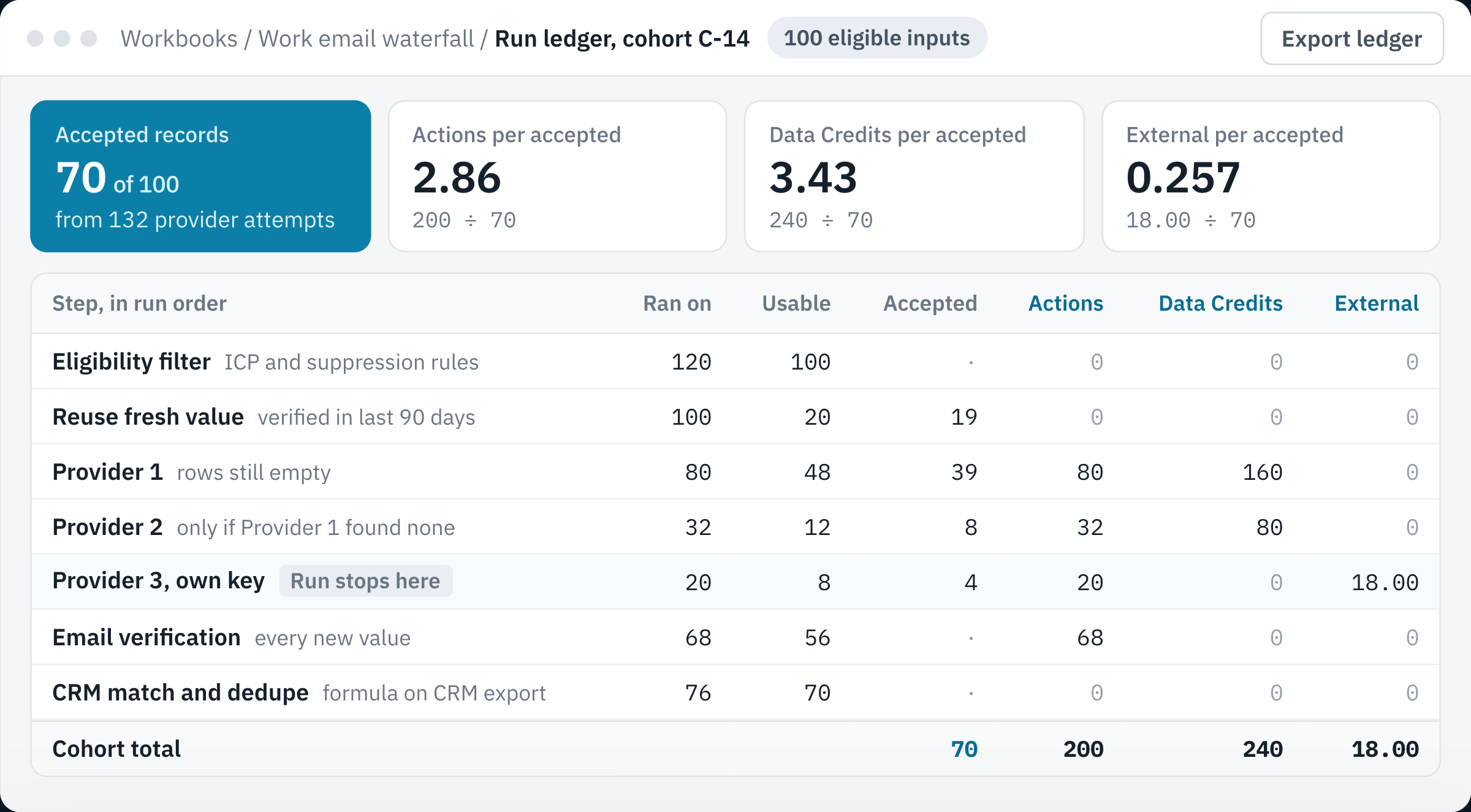
- Per accepted recordEach ledger total is divided by the 70 records that passed every check.
- Early stopProvider 2 runs only on the 32 rows that Provider 1 left empty.
- Last providerProvider 3 adds 4 accepted records for 20 Actions and 18.00 in external charges.
- Separate ledgersActions, Data Credits and external charges stay in their own columns until you apply a documented conversion.
Design the test before changing the waterfall
Take a representative, permission-appropriate sample and freeze the acceptance rules. Compare a current baseline configuration with a proposed sequence. Hold the input set, date window, exclusions and verification standard constant. Test enough rows to expose common error types, but treat a small sample as directional only.
Compare both configurations on the same frozen inputs in isolated test runs, with production writeback disabled. If that is impractical, use balanced separate cohorts and disclose that the inputs differ. Review provider order, run conditions, fallbacks and no-result handling. Clay documents sequential waterfall providers and pre-run estimates; verify actual usage for the configured actions in your account.
- Record accepted count, total Actions, Data Credits, external provider cost, error count and review time.
- Calculate cost by cost category and combined configured spend per accepted record.
- Inspect a sample of accepted and rejected records for false matches and weak data.
A small batch is useful for finding configuration errors; it is too small to estimate a stable production success rate. Clay recommends small initial test batches in its credit-conservation guidance. Include sparse records, similar company names and failed validations before expanding the test.
Use conditional steps to avoid unnecessary calls
Put low-cost, high-confidence checks before expensive research where the task allows it. Remove records already disqualified by ICP or suppression rules before paid enrichment. Reuse data that is still fresh when policy permits. Add provider steps only when the previous result is missing or fails the agreed quality test.
Do not optimize on consumption alone. A cheaper source order can lower cost while also reducing coverage or increasing correction work. Choose a sequence that passes the quality threshold at an acceptable operating cost, and make its exceptions visible.
The enrichment, matching and writeback guide covers the delivery architecture. Use this cost ledger alongside it to evaluate accepted output.
- Filter ineligible rows before enrichment.
- Use run conditions for known stopping rules.
- Refresh only when the value is stale relative to the business need.
- Keep a manual review path for uncertain identity or unsupported fields.
A small synthetic calculation
Examples in this guide use fictional numbers. The table below represents 100 eligible inputs and 70 accepted outputs, with independent totals of 200 Actions, 240 Data Credits and 18 units of external currency.
For a real run, define whether the numerator includes sourcing, provider attempts, verification, retries, AI research and CRM exports. Preserve each usage category before applying a monetary allocation. Platform subscription allocation and incremental cash spend answer different questions, so label the view you choose.
To calculate one monetary number, choose and document the allocated currency cost of each Action and Data Credit, add the external spend without double-counting it, and divide by accepted count. If the subscription fee already includes those units, do not add that same fee again. Do not invent a universal exchange rate between Actions, Data Credits and money.
On smaller screens, scroll to compare all columns.
| Measure | Cohort total | Per accepted record |
|---|---|---|
| Eligible inputs | 100 | Not used in the per-record math |
| Accepted outputs | 70 | Divide each total by this count |
| Actions | 200 | 2.86 Actions |
| Data Credits | 240 | 3.43 Data Credits |
| External charges | 18 currency units | 0.257 currency units |
Compare two waterfalls before choosing the cheaper one
Consider a separate comparison: both configurations start with the same 100 eligible inputs, use the same unique-record acceptance rules, and include the same cost categories. The currency amounts below are invented allocated costs.
On smaller screens, scroll to compare all columns.
| Measure | Configuration A | Configuration B |
|---|---|---|
| Total allocated cost | 60 currency units | 72 currency units |
| Unique accepted records | 50 | 75 |
| Cost per accepted record | 60 / 50 = 1.20 | 72 / 75 = 0.96 |
| Difference from A | Baseline | 12 more cost units; 25 more accepted records in total |
B spends 20% more in total but costs 20% less per accepted record. Its net additional cost divided by its net additional accepted count is 12 / 25 = 0.48 currency units. That ratio helps assess the tradeoff; it does not prove the extra records will convert or that B preserves every record accepted by A. Inspect which records each configuration accepts.
The break-even point is 60 accepted records for B: 72 / 60 = 1.20, equal to A. At 59 accepted records, B costs about 1.22 each and loses its unit-cost advantage. If B’s apparent extra matches fail the fixed quality rules, remove them from the accepted count and recalculate. Do not lower the rules to protect the result.
A lower unit cost also does not override a hard budget or a coverage requirement. If only 60 cost units are available, B is unaffordable in this example. If sales needs at least 70 accepted records, A falls short. Choose the configuration that meets the operating constraints, then validate it on a larger representative cohort before scaling.
Release and monitoring checklist
Before scaling, confirm the acceptance definition, current per-action estimate, plan limits, provider terms, external-key costs, currency conversion policy, retries, duplicate execution behavior, source freshness and review owner. Use Clay’s usage and credit views after the test to compare actual consumption with the estimate.
Monitor acceptance and error rates by cohort and step. Alert on an unexpected rise in expensive fallbacks, repeated retries, low verification, depleted allowance or lower accepted count. Revisit the workflow when sources or prices change. Keep a dated version of the configuration so cost changes can be associated with a deliberate edit.
- Decision rule: keep a provider step only when its marginal accepted-record contribution justifies its marginal spend and operational complexity.
Sources and review date
Product details reflect the documentation below as of 12 October 2026. Availability and billing depend on your configured account. The decision frameworks above are implementation guidance from AGI Technologies.
Review the cost of usable output
AGI Technologies can help define acceptance rules, compare provider conditions and build a usage ledger before you scale. A useful starting brief names the record unit, required fields, current monthly volume, available usage evidence and the person who accepts the output.
Use the Clay implementation planning worksheets to record your pilot scope and acceptance rules. For implementation fees and procurement, use the separate Clay implementation cost guide.
Reviewed by Andrii Gorbenko, founder of AGI Technologies