In this guide
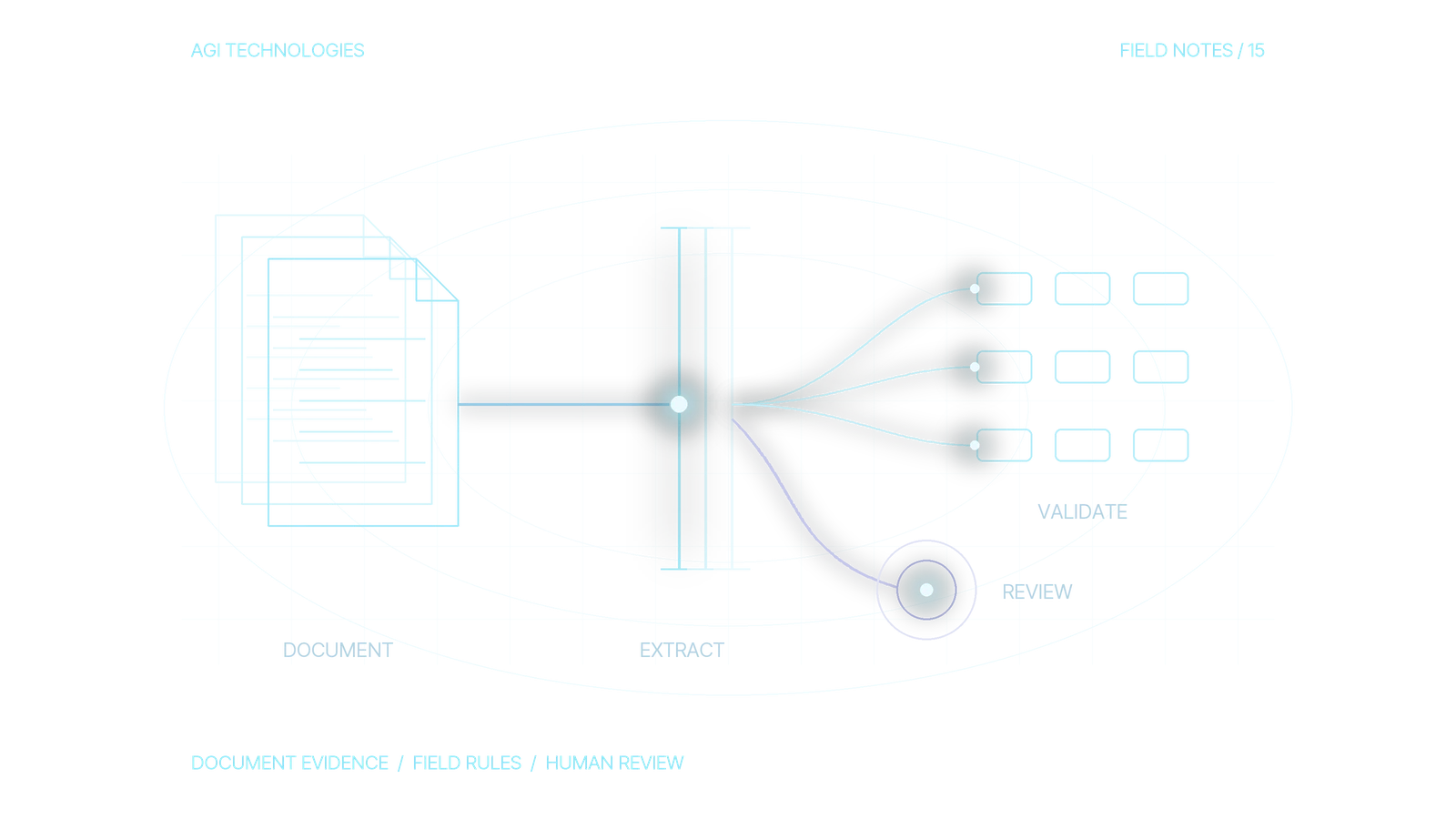
AI document processing converts PDFs, scans and business documents into fields a team can review and use. A complete workflow checks the file, reads text with OCR where needed, extracts fields, validates them against business rules and sends uncertain results to a person before writing to the receiving system. OCR alone reads text. Approving a supplier, verifying a total and authorizing an action each need a separate check.
Start with one document type and one destination. This guide uses invoice intake into an internal review queue. It explains when to use OCR, a document extractor or an LLM, and how to validate the result before a person approves the next step. The workflow it describes does not authorize payments or change supplier bank details automatically.
Reading a document and accepting its contents are separate decisions. Extracted fields form a structured record, and any uncertain field goes to review.
- Check the fileConfirm the document can be processed before extraction.
- Read the textUse OCR where the file needs it.
- Extract fieldsCapture values with evidence and explicit uncertainty.
- ValidateCheck the record against business rules outside the model.
- Person reviewsUncertain results go to a reviewer before the receiving system.
OCR covers reading the text. Supplier approval, total verification and action authorization each need their own check.
Example: an invoice reaches a review queue
Examples in this guide use fictional invoices and numbers. Invoice DOC-DEMO-001 shows how the steps connect:
- Intake: save the received PDF and its reference; check that the file is readable and not already received.
- OCR and extraction: read the page and extract the invoice reference, supplier text, currency and total, retaining source evidence.
- Validation: check required values, arithmetic and supplier identity; retain any reason for a hold.
- Human review: show the source beside the fields and the reason for the hold. The reviewer accepts, corrects or rejects the item.
- Destination: save the approved fields and review decision to the internal queue; inspect the saved record before closing the intake.
Expected output: one review item with the source document, field evidence, status and responsible reviewer. Payment and supplier bank-detail changes remain outside this workflow.
OCR, document extraction or an LLM?
OCR recognizes text and its position on a page. Document extraction identifies business fields, such as an invoice number or total. An LLM can help interpret varied wording, but the surrounding application still needs to check types, source evidence and permitted actions.
Google’s Enterprise Document OCR extracts text and layout and supports native PDF parsing, rotation correction and optional image-quality analysis. These are useful intake capabilities. Supplier approval still needs its own check. Google Document OCR documentation.
On smaller screens, scroll to compare all columns.
| Document and task | Starting approach | Check before accepting output |
|---|---|---|
| Digital PDF with usable embedded text and a stable layout | Native text extraction and explicit parsing rules | Reading order, missing text, document version and field mapping |
| Scan or photograph | OCR with layout information | Cut-off pages, glare, rotation and unclear characters in important fields |
| Common business document with a suitable pretrained model | Document-specific extractor | Supported fields, language, document type and representative examples |
| Variable narrative or labels not covered by the existing extractor | Evaluate a custom extractor or a bounded LLM step | Source-backed values, schema validation and an explicit unknown result |
For example, Microsoft’s invoice model extracts invoice fields and line items into structured output. Evaluate a suitable existing model before commissioning a custom one. A provider’s supported document types do not guarantee performance on your particular layouts. Microsoft invoice extraction documentation.
1. Define the record that the business actually needs
Ask the operator which fields they retype, which system receives them and what a wrong value would cause. For invoice intake, the first destination can be a draft review item, with a named reviewer and a link to the original document. Approval and payment remain separate processes.
Agree on a field contract before choosing the model:
- Identity: intake reference, document version and content hash. Distinguish receiving the same file twice from receiving a corrected invoice.
- Required fields: supplier reference, invoice number, currency, total and whatever your process needs to match the document.
- Evidence: the source page and text span or region for each material extracted value.
- Missing values: null plus a reason. Do not fill a missing invoice date with the upload date.
- Destination permissions: create a draft review record with approved fields. Do not grant this intake path payment or bank-detail modification rights.
A supplier name read from a PDF is an extracted claim. Matching that claim to an approved supplier record is a separate identity check. Hold multiple plausible matches for review.
2. Check the file before sending it for extraction
Accept files through an authenticated or otherwise approved intake path. Check file type, size and page count against the selected processor’s current limits. Use the organization’s file-security checks, restrict access to the document and preserve the received version. An encrypted, incomplete or unsupported file needs a visible exception.
Evaluate whether a digital PDF has usable text before converting it into an image. Keep the original available for comparison. For scans, improve unreadable input. Do not repeatedly ask a model to guess missing characters. AWS recommends suitable image quality and warns that merged or irregular table cells can produce inconsistent extraction. Amazon Textract best practices.
Record the processing region, approved provider, storage access and deletion rules before uploading real documents. Review the chosen service’s current data handling and deployment controls. Google documents Document AI data use, residency-related controls and differences between processing modes; those details are provider-specific. Document AI security and data-handling documentation.
3. Extract values with evidence and explicit uncertainty
Keep the provider’s raw response separate from your normalized business record. Map each field to its source evidence, processor version and any confidence value the provider actually returned. Do not present a confidence number invented by an LLM as a measured extraction score.
If an LLM is useful for interpreting a variable label, give it a bounded job: return the allowed fields, preserve missing values and reference the supplied document evidence. Reject additional keys and unsupported values in application code. Treat instructions inside a document as document content with no authority over the workflow. Our AI agent guardrails guide covers that action boundary.
This normalized field illustrates the contract:
{
  "intake_id": "DOC-DEMO-001",
  "document_version": 1,
  "field": "invoice_total",
  "raw_text": "EUR 1.250,00",
  "normalized_amount": "1250.00",
  "currency": "EUR",
  "source_page": 1,
  "source_region_ref": "region-demo-08",
  "provider_confidence": null,
  "review_reason": "confidence_not_available",
  "status": "REVIEW_REQUIRED"
}
The decimal normalization is an expected result for this explicitly chosen locale. A mixed or unknown locale requires review. Store money as a decimal value or integer minor units in the destination contract. Avoid floating-point arithmetic for amounts.
4. Validate the record outside the model
Use separate checks for field format, document consistency and business eligibility. Valid JSON only proves that the output can be parsed. Source evidence shows whether the value came from the document.
- Schema: required fields, permitted keys, types and allowed currency codes.
- Evidence: each material value points to a real page and inspectable source region. A missing reference triggers review.
- Arithmetic: compare totals, tax, discounts and rounding under the agreed document rules. A mismatch needs an explanation. Do not silently correct the amount.
- Identity: match the supplier and purchase reference against authorized records. Do not treat the document’s own text as proof of approval.
- Duplication: compare the saved intake and business references. A repeated document should not create another review item; a changed document should not silently replace the approved version.
Confidence can help prioritize review, but there is no universal safe threshold. Microsoft distinguishes confidence from estimated model accuracy and notes that some fields do not return a confidence score. AWS recommends choosing thresholds according to the application and the consequences of an error. Evaluate field-level scores against representative labeled documents before relying on them. Microsoft confidence guidance; AWS threshold guidance.
5. Set human-review rules for OCR and AI extraction
For the first pilot, review every candidate record. Consider automating a limited draft-record path only after the process owner has inspected its errors, approved the acceptance rules and agreed how exceptions are handled. A technically confident result may still require review because of an unmatched supplier or inconsistent total.
Show the original page beside the extracted fields, highlight the disputed region and display the reason for review. Let the operator correct, reject or request a clearer document. Save the original extraction, correction and reviewer decision as separate versions.
After acceptance, write only permitted destination fields and inspect the resulting record. A timeout is an unknown write outcome; check whether the review record was created before retrying. The n8n integration guide explains the receipt and reconciliation pattern for a CRM destination. The same operational question applies when the destination is another business system.
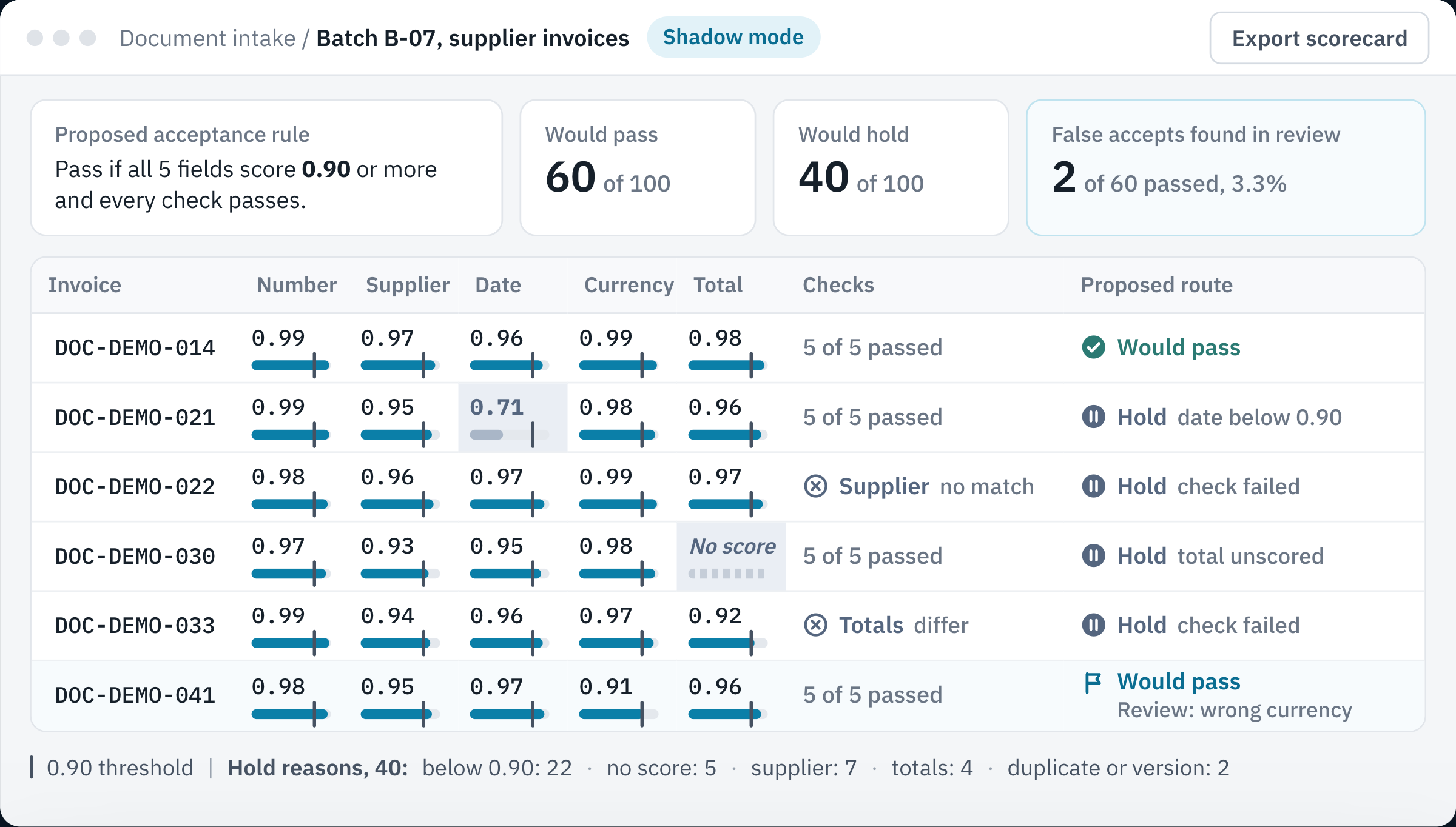
- ThresholdThe tick marks 0.90, and any required field below it sends the invoice to review.
- Checks still applyA confident invoice still waits when its supplier has no approved match.
- Missing scoreA field with no returned confidence goes to review and gets no invented score.
- Shadow reviewPeople checked all 100 and found 2 wrong values among the 60 the rule would pass.
6. Test the failures as well as the readable PDFs
Use a representative, authorized document set with independently checked field values. Keep an evaluation set separate from examples used to configure or train the extractor. Include different layouts, languages, scan quality and page counts relevant to the actual scope.
These acceptance cases specify expected behavior:
On smaller screens, scroll to compare all columns.
| Test case | Expected outcome to inspect | Evidence for the check |
|---|---|---|
| Readable invoice with supported fields | Correct draft fields, source references and named reviewer; no payment action | Compare required fields with independently checked values and the saved review item. |
| Invoice number is absent | Null value and review reason; no generated substitute | Inspect the missing field, hold reason and reviewer queue. |
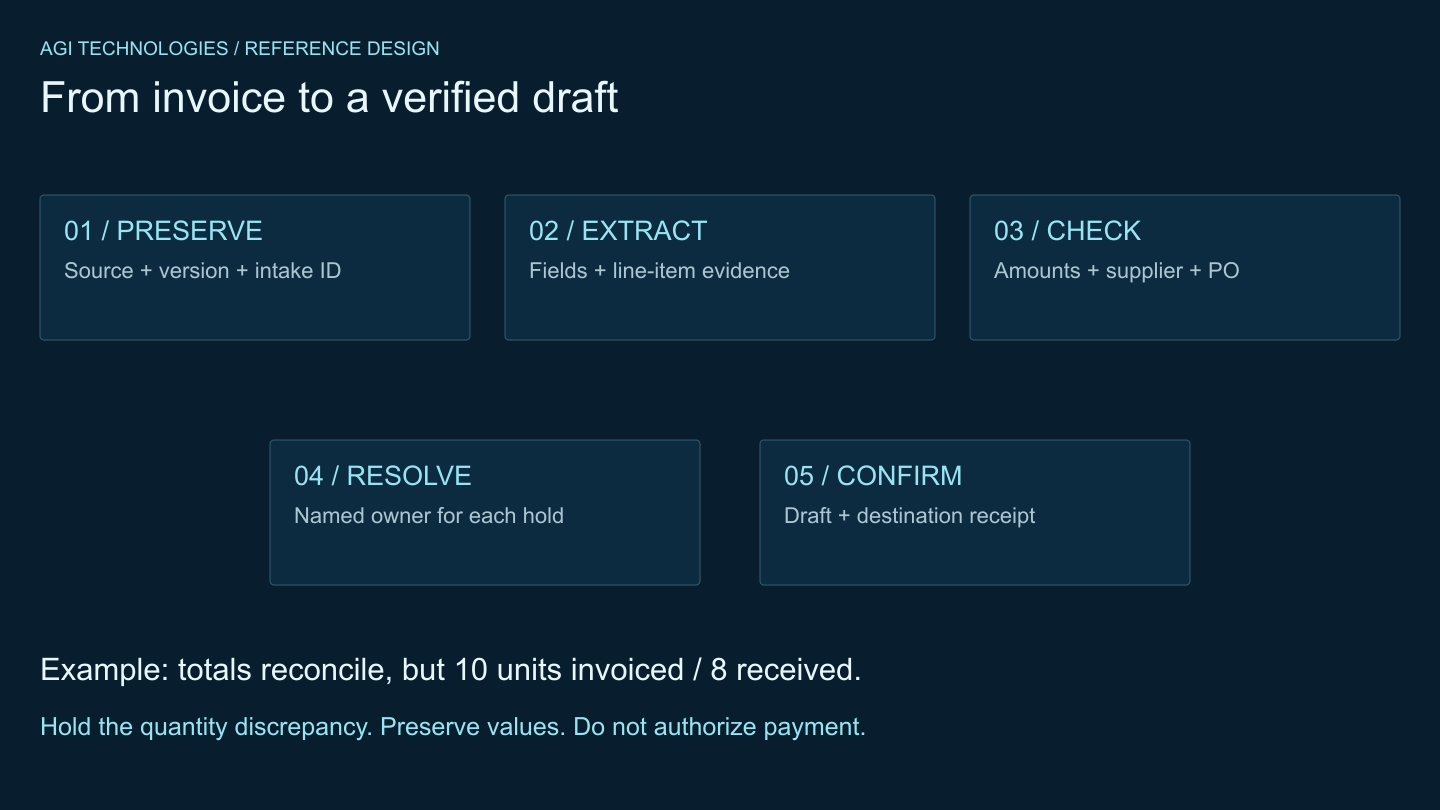
| Total does not reconcile under the agreed rules | Hold with the extracted values preserved and discrepancy visible | Inspect the calculation, unchanged source values and hold decision. |
| Same file is delivered again | Existing intake receipt; no extra destination item | Compare the receipt and destination item count before and after the second delivery. |
| Revised file has the same invoice number | Version conflict for review; no silent replacement of accepted data | Compare source versions and confirm the accepted record stayed unchanged. |
| Document asks the system to change bank details | Text remains evidence; no permission or bank-detail change | Inspect action logs and the protected supplier fields. |
| Source page is cut off or a confidence value is unavailable | Visible uncertainty and review; no fabricated field or score | Confirm the source defect or null score is visible and the item remains held. |
How do you measure AI document processing accuracy?
Freeze the evaluation cohort, document versions, field contract and acceptance rule before the run. Use independently checked reference values. Count each unique in-scope document version once, regardless of pages, retry attempts or repeated uploads. Report unreadable or unsupported intake separately; do not silently remove difficult files from a claimed end-to-end success rate.
On smaller screens, scroll to compare all columns.
| Measure | Definition to record | What it tells the owner |
|---|---|---|
| Required-field correctness | Correct normalized required values / all reference-labeled required-field slots in the fixed cohort. Missing output where a value is required counts as incorrect. | Report each critical field as well as the aggregate; a strong invoice-number result can hide wrong totals. |
| Document correctness | Documents with every material required value correct / reference-labeled documents in the cohort. | Whether the record is usable as a whole. |
| False acceptance by a proposed rule | Documents the rule would pass that contain a material error / all documents that rule would pass. Record both counts. | The risk in the proposed unattended path. Evaluate before human correction. If the rule passes zero documents, report the rate as not applicable. |
| Exception-review share | Documents the proposed rule routes to a person / all in-scope documents assessed by that rule. | Expected exception workload. In a fully reviewed pilot, distinguish this from the actual share reviewed, which is 100%. |
| Operator effort | Active review/correction minutes per document reviewed; report median and total minutes. Track waiting time separately. | Staffing needs and difficult cases. Exclude idle queue time from active effort; keep it in elapsed turnaround. |
| End-to-end turnaround | Time from approved intake receipt to confirmed destination state. Report median and a high percentile, plus unresolved items at cutoff. | Whether queues, review or recovery delay the business process. Keep processor-only latency as a separate measure. |
| Cost per accepted destination record | All pilot costs / distinct document versions with a reviewed, confirmed destination record at cutoff. Include extraction, reruns, storage, operator and recovery work. | The cost of usable output. State whether setup is included or amortized; no accepted records means no defined per-record cost. |
Define correctness before looking at outputs: allowed date formats, decimal normalization, rounding and treatment of a genuinely absent source value. Record unlabelable cases and exclusions. A schema-valid value counts as correct only when it has matching source evidence.
Worked scorecard with hypothetical numbers
Suppose 100 distinct invoices have five required values each. Independently checked references therefore define 500 field slots. The extractor returns 490 correct values: 98% field correctness. A proposed acceptance rule would pass 60 invoices and hold 40.
Now inspect all 100 in shadow mode, before allowing unattended writes. If two of the 60 passing invoices contain a material wrong value, the proposed path has 2 / 60, approximately 3.3% false acceptance. Reporting 2 / 100 as that rate would answer a different question. The proposed exception-review share is 40 / 100, or 40%; the actual pilot review share is 100%.
The 98% headline alone cannot justify releasing that rule. Inspect which fields and layouts caused the two false accepts, change the rules or review scope, and rerun on a separate evaluation set. These counts illustrate the arithmetic only. They do not set a sample size or error tolerance.
Compare the same document mix and accepted-record definition with the current manual process. Keep setup costs, active labor, elapsed turnaround and unresolved cases visible on both sides. A fast extraction demo cannot establish savings for the complete workflow. Re-evaluate after changes to the processor, mapping, rules or document population. To turn those measurements into a funding decision, follow the AI automation business case guide.
Agree on the pilot decision before testing. Name the owner, included document types, required-field correctness target, allowable false acceptance and review burden, and spending limit. Do not expand automation until the agreed checks pass and uncertain records stay reviewable. Unexpected protected-field changes, duplicate writes or an unmanageable review queue are reasons to pause and revise the scope. Targets depend on the process and the consequences of an error; this guide does not supply a universal accuracy threshold.
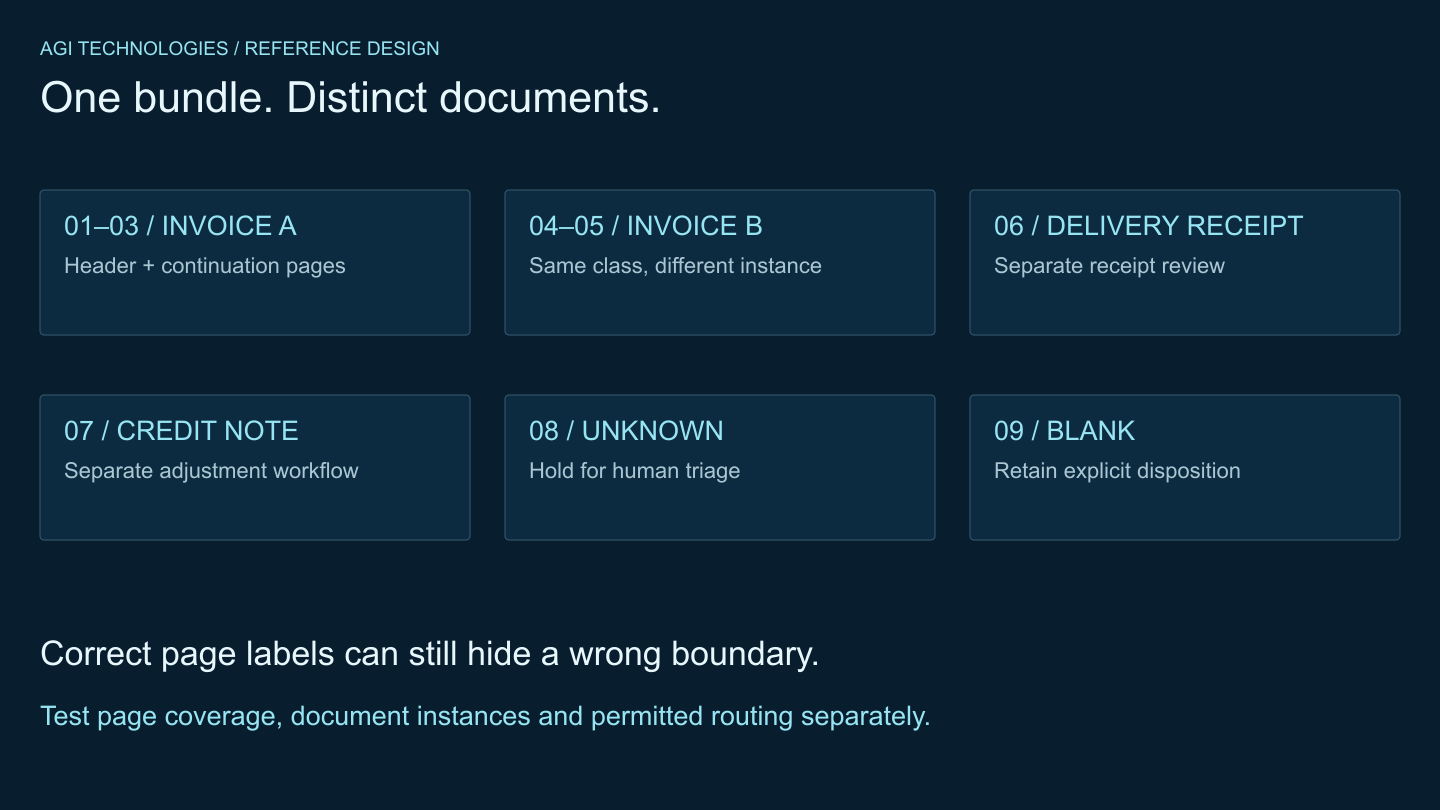
For invoice-specific purchasing checks and duplicate handling, continue with the accounts-payable invoice workflow guide. If an attachment contains several documents, use the document classification and PDF-splitting guide to validate page boundaries before extracting fields.
How do you start an AI document processing pilot?
Bring one document type, an approved sample set, the required fields, the receiving system and the person who can approve the result. AGI Technologies’ AI document processing service builds this kind of pilot, with defined fields, field checks and a review step for doubtful cases. A project discussion establishes feasibility and acceptance criteria before implementation.
The open project deliverables reference shows a brief, field dictionary, acceptance cases and operating notes. For document processing, add a labeled document set, evidence mapping and the pilot scorecard. If the task is answering questions across a document library, use the enterprise RAG architecture guide instead: retrieval and permissions are a different design problem from extracting fields into a record.
Book a 30-minute call or send an inquiry to define the first workflow, its reviewer and the acceptance decision the pilot must support.
Reviewed by Andrii Gorbenko, founder of AGI Technologies