In this guide
This glossary defines the Clay, HubSpot and AI automation terms used across our guides. Each answer is short and links to the guide that covers the topic in depth. Product features and plan availability change, so confirm details in your own workspace or portal.
Clay terms
Claygent
Claygent is Clay’s AI research agent. For each row in a Clay table, it searches and reads public web pages to answer a question you write, then returns the answer to a column. See the Claygent research guide.
Clay Signals
Clay Signals watch a list of companies or people on a schedule and add a new row when something changes, such as a job change or company news. Custom Signals let you define the condition yourself. See the Clay Custom Signals guide.
Clay waterfall enrichment
A waterfall tries selected data providers in a defined sequence for one field and can stop when it finds an acceptable result. Provider order depends on the field, the coverage you need and the credit budget. See the enrichment and writeback guide.
Clay enrichment credits
Clay separates platform Actions from marketplace Data Credits, and some steps use your own provider keys at the provider’s own price. Measure cost per accepted record across all three. See the waterfall cost guide.
Clay API
“Clay API” covers several ways to move data in and out of Clay: an HTTP API column, an HTTP API source, an inbound table webhook, a Public API routine that runs a function built in Clay, and a Tables API that reads table records. See the Clay API integration guide.
Clay table webhook
An inbound table webhook receives JSON posts into a Clay table, one row per submission. Clay documents a lifetime limit of 50,000 submissions per webhook source, which persists after rows are deleted. The Clay API integration guide covers webhooks, polling and receipts.
Writeback
Writeback is the step where approved values from Clay update fields in HubSpot. Match the CRM record first, then update only the fields Clay is allowed to own. See the Clay and HubSpot integration guide.
HubSpot terms
HubSpot lifecycle stages
Lifecycle stages describe the relationship with a contact or company. HubSpot’s defaults are Subscriber, Lead, Marketing Qualified Lead, Sales Qualified Lead, Opportunity, Customer and Evangelist, plus Other. See the lifecycle stages guide.
HubSpot Lead Status
Lead Status is a contact property that tracks sales follow-up within the Sales Qualified Lead stage. Its default values are New, Open, In Progress, Open Deal, Unqualified, Attempted to Contact, Connected and Bad Timing. See the HubSpot Lead Status guide.
HubSpot Record ID
A Record ID is the unique number HubSpot gives each record. It is unique within an object type, so a contact and a company can share the same number; store the object type alongside the ID. See the HubSpot data model guide.
HubSpot association
An association links two records, such as a contact and the company they work for, or a deal and its contacts. A primary company label marks the main company for a contact or deal. See the HubSpot CRM data model guide.
HubSpot custom object
A custom object is a record type you define for something the standard objects do not represent well, such as a subscription or a site. Create one only when its records need their own properties, associations and reporting; the HubSpot data model guide compares the options.
HubSpot duplicate management
HubSpot deduplicates contacts by email and companies by domain name, but companies created through the API, including sync apps, are not deduplicated by domain. See the HubSpot deduplication guide.
HubSpot Data Model Health Check
A built-in scan under Data Management > Data Model > Health that flags issues across objects, properties, associations, pipelines and lifecycle stages, such as low fill rates and duplicate properties. The HubSpot portal audit checklist shows how to run it and what to fix first.
Lead routing
Lead routing assigns each new lead to an owner by rules such as territory, existing account ownership, customer status and capacity. Test it with records that cover each rule and exception. See the HubSpot lead routing audit.
GA4 and HubSpot attribution differences
They count different things: GA4 reports sessions and events, while HubSpot reports contacts and deals with their own source properties. Compare the same unit and conversion before calling a difference an error. See the GA4 vs HubSpot attribution guide.
AI automation terms
AI agent vs workflow automation
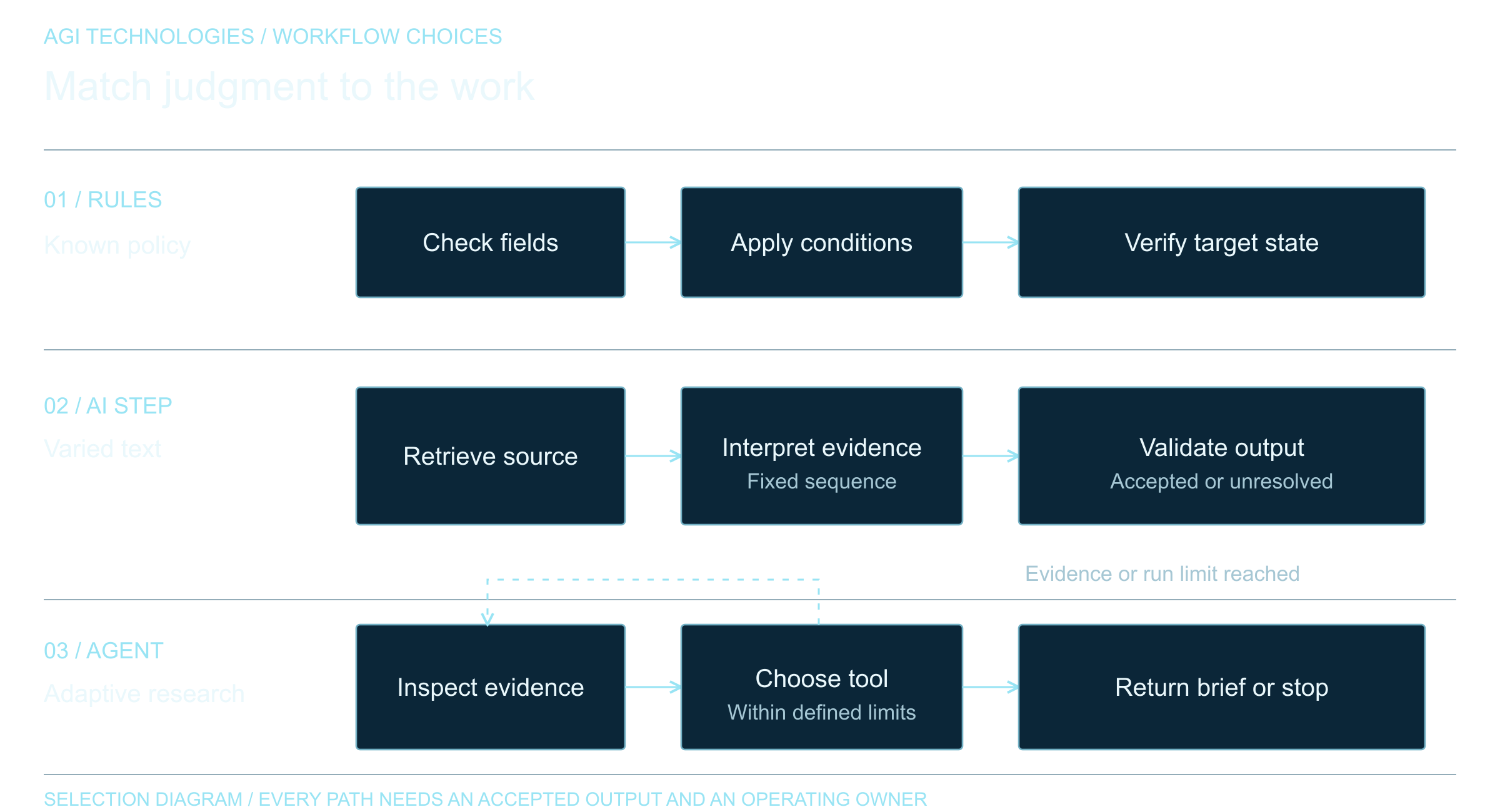
In workflow automation, the steps are fixed in advance, even when some steps call a model. An AI agent chooses its own next step during execution. See AI agents vs workflow automation.
AI agent guardrails
Guardrails are the limits around what an agent may do: narrow tool permissions, human review at defined points, and tests for both its decisions and its side effects. See the AI agent guardrails guide.
RAG (retrieval-augmented generation)
Retrieval-augmented generation answers a question from documents retrieved at query time. In a business setting, permissions must be enforced before a passage reaches the model. See the enterprise RAG architecture guide.
AI document processing
AI document processing converts PDFs, scans and business documents into fields a team can review and use. A complete workflow checks the file, extracts values with evidence, validates them and sends uncertain fields to a person. See the AI document processing workflow.
PDF splitting
PDF splitting identifies which pages of a multi-document file belong to each document, so each invoice or form is processed on its own. See the document classification and PDF splitting guide.
Human review threshold
A review threshold sends an extracted value or decision to a person when the system’s evidence or confidence falls below an agreed level. Set it from tested examples, then check how many errors pass and how many items reach the queue. The AI document processing guide explains how to choose one.
For help applying these in your own systems, see our services.
Reviewed by Andrii Gorbenko, founder of AGI Technologies